

Opsiton Platform User Guide
Comprehensive guide for end users and tenant admins. Learn how to deploy, configure, and operate the Opsiton dual-layer DLP platform.
Last updated: October 1, 2026
1What is Opsiton?
Opsiton is a modern, dual-layer endpoint Data Loss Prevention (DLP) platform. It prevents confidential and regulated data from leaving corporate devices — across web browsers, desktop applications, developer IDEs, and command-line terminal tools.
Dual-Layer Architecture
- 1Central Management: Administrators define and publish security policies from the Tenant Portal
- 2Native Endpoint Agent: A lightweight native system service (with WFP driver on Windows or Network Extension on macOS) intercepts system traffic and terminal commands
- 3Browser Extension: Deep DOM and UI interception inside Chrome, Edge, and Brave for instant user warnings and block screens
- 4On-Device Inspection Engine: Enforces real-time DLP inspection locally on the endpoint with sub-15ms latency
- 5Real-time Visibility: Sanitized security events and incidents sync to the Opsiton portal for audit and investigation
What Opsiton Detects
- Sensitive text typed into web forms and chat inputs
- Credit card numbers validated via deterministic checksum verification
- National ID (TCKN) and IBAN numbers validated with structural checksum rules
- File uploads inspected by MIME type, extension, and full text extraction (PDF, DOCX)
- Turkish and English OCR extraction from uploaded image files
- Data pasted into 40+ AI services at the network layer, with deep in-browser DOM protection on 6 major GenAI platforms (ChatGPT, Claude, Gemini, Copilot, DeepSeek, Perplexity)
- Visits to malicious, phishing, or unapproved threat URLs
- Terminal commands and desktop application network exfiltration
2Platform Components
| Component | Target Surface | Purpose |
|---|---|---|
| Tenant Portal | Admins & Security Teams | Central web console to manage policies events incidents users and deployment |
| Native Endpoint Agent | macOS & Windows Devices | High-performance native core that runs local network inspection and enforces policies on the endpoint |
| Browser Extension | Chrome Edge Brave Chromium | Intercepts paste drag-and-drop form submissions and delivers in-browser warn/block dialogs |
| On-Device Network Gateway | Endpoint OS Network Stack | System-wide inspection gate for desktop apps IDEs and terminal utilities outside the browser |
| Fleet Health Telemetry | Platform Operations | Central health telemetry monitoring agent fleet latency and operational status |
3Privacy & Zero-Data-Exfiltration Architecture
Opsiton is architected on a strict Zero-Data-Exfiltration model. Your sensitive files, confidential prompts, and private customer records never leave the local endpoint to Opsiton cloud servers.
- On-Device Inspection: All pattern matching, checksum verifications, OCR parsing, and NER-based contextual model evaluations execute 100% locally on the device CPU/GPU
- Sanitized Event Telemetry: When a policy violation occurs, Opsiton transmits only sanitized metadata: rule name, timestamp, domain/application name, severity, and a SHA-256 content hash with masked snippet
- Zero Plaintext Storage: Neither the portal nor Opsiton cloud databases ever receive or store the raw sensitive data.
4Fail-Safe Architecture: Fail-Open vs. Fail-Closed (REQ-PRX-001)
An IT buyer's primary reliability question is: "What happens if your agent crashes or the daemon stops?" Opsiton operates under a formal fail-safe contract (REQ-PRX-001) that transparently balances non-disruptive business operations against zero data compromise.
Target vs. General Traffic Contract
| Traffic Category | Agent Healthy | Agent Stopped / Degraded | Rationale & Enforcement |
|---|---|---|---|
| Admin-Targeted Risk Domains (ChatGPT Claude Gemini etc.) | On-Device TLS Inspection & Policy Enforcement | Fail-Closed (Immediate Connection Drop) | Prevents confidential data leakage when inspection engine is unavailable |
| General Business Traffic & Non-Risk Websites | Inspected or Direct Routing | Fail-Open (Direct Connection) | Prevents enterprise network outages; an unhealthy agent is an IT ticket not a company blackout |
| Direct Exemption Domains & OS Infrastructure | Direct Bypass Route | Fail-Open (Direct Connection) | Preserves OS updates Apple APNs MDM commands and enterprise internal systems |
Enterprise Norm & Empirical Verification
- Industry Standard: Leading enterprise DLP and network security products (Forcepoint "no policies are enforced", GlobalProtect default fail-open) establish that endpoint security must not turn into a single point of operational network failure.
- Empirical Live Verification: Validated on live Chrome and Safari sessions — when the Opsiton daemon is stopped, admin-monitored AI endpoints (chatgpt.com) are instantly dropped (fail-closed) while corporate web tools remain accessible (fail-open).
- Automated IT Visibility: When an agent stops or loses policy synchronization, it reports a degraded status to the central portal and triggers IT diagnostics without disrupting end-user workflows.
5User Roles & Access Control
Access to the Tenant Portal is governed by role-based access control (RBAC):
| Role | Permissions |
|---|---|
| Viewer | Read-only access to security events incidents active users policies and reports |
| User | Standard employee access with view permissions and self-service status checks |
| Tenant Admin | Full administrative authority: create/edit policies invite members manage API keys deploy agents and manage subscriptions |
6Tenant Onboarding & Quick Start
Step 1: Register Your Organization
Visit the Opsiton Tenant Portal and click Get Started or Register. Enter your full name, organization name, corporate work email, and secure password.
Step 2: Onboarding Setup
- 1Create your first DLP policy from verified compliance templates (e.g. Payment Card Checksum, National ID, AI Platform)
- 2Obtain your fleet Enrollment Token from the Agent Deployment page
- 3Deploy the Opsiton Agent via MSI/PKG or MDM profiles with Chrome/Edge extension force-installation
- 4Verify live connection on the Dashboard
7Security Operations Dashboard
The Dashboard provides real-time situational awareness across your entire organization.
Security Posture Score
A dynamic 0-100 score quantifying fleet security health. The score decreases with unaddressed high-severity events and open incidents, and recovers as incidents are investigated and resolved.
Live KPI Cards
| Card | Metrics Shown |
|---|---|
| Portal Users | Active security team members with portal access |
| Application Users | Total enrolled endpoint devices and real-time online count |
| Active Policies | Number of enabled DLP, AI, and Threat URL rules |
| Events 24h | Total security detections recorded over the last 24 hours |
| Open Incidents | Unresolved security cases requiring triage and investigation |

8Policy Management & Enforcement
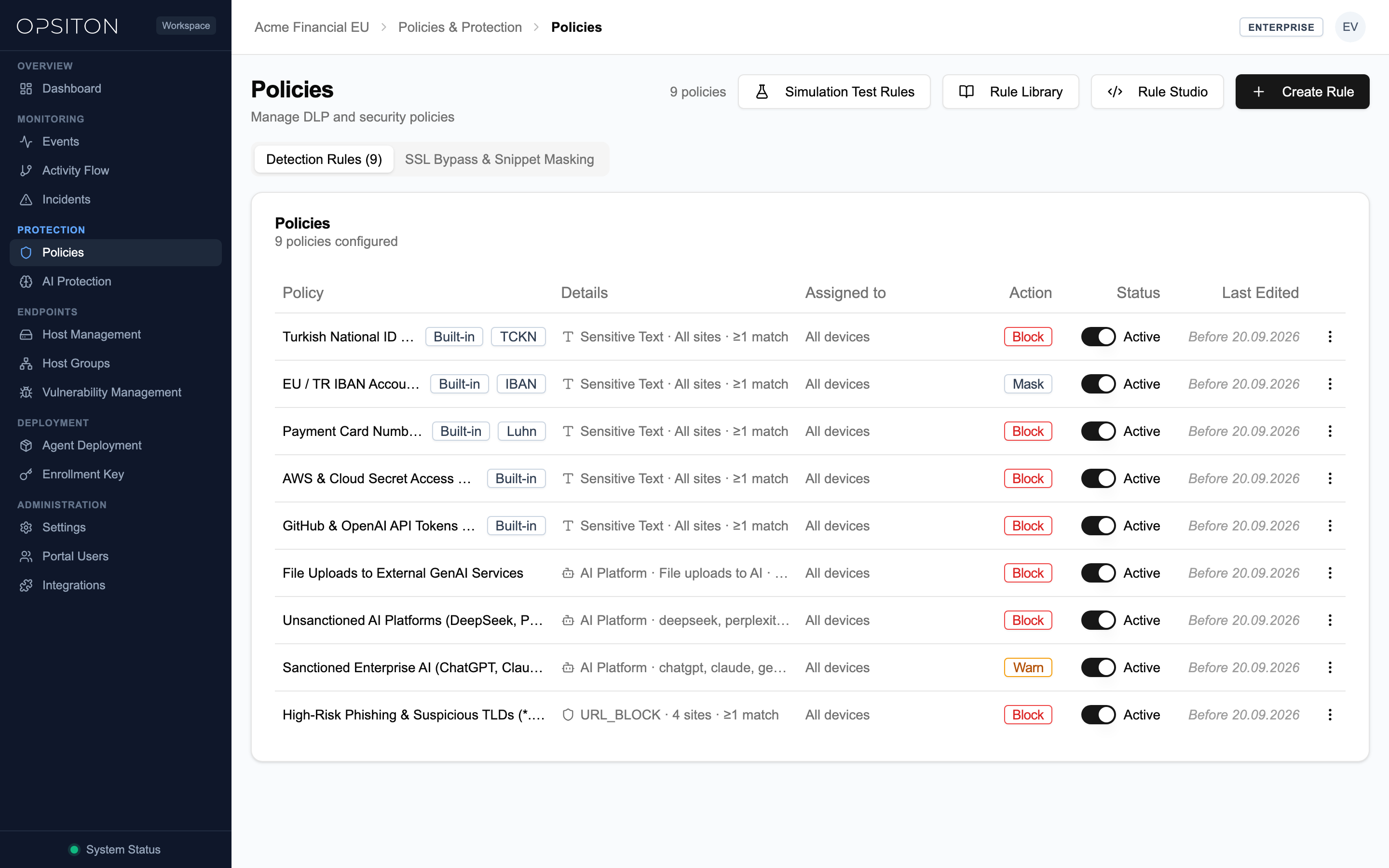
Policies dictate what data patterns to detect and what enforcement action to take when an employee interacts with sensitive data.
Enforcement Actions
| Action | User Experience & System Behavior |
|---|---|
| Block | Immediately terminates the transfer. Displays an instant full-screen or toast block dialog with the violation justification. |
| Warn | Displays an interactive warning dialog showing risk details. The user must provide a business justification to proceed or cancel the action. |
| Log | Silently allows the action while recording an audit event in the portal for security analysis. |
| Mask (Enterprise) | Replaces sensitive PII in AI prompts with session tokens (e.g. [TCKN_1] [IBAN_1]) before transmission and automatically restores them in streamed AI responses; event snippet visibility (last N characters) is also configurable across all plans. |
Built-in Rule Templates
- Payment Cards (deterministic checksum verification)
- TC Kimlik No (11-digit structural verification)
- Türkiye IBAN (international banking checksum validation)
- Turkish Mobile & Landline Phone Numbers
- Email Addresses & Confidential Token Patterns
- GDPR, KVKK, and PCI-DSS Compliance Frameworks
9Policy Types & Detection Engines
Opsiton features seven specialized detection engines designed for high-accuracy DLP without false positives:
| Policy Type | Engine Description | Example Use Case |
|---|---|---|
| DLP_TEXT | High-speed pattern and keyword matching | Confidential project codenames API keys internal URLs |
| CHECKSUM | Mathematical checksum and structural validation | Credit Card numbers (Visa/Mastercard/Amex) IBAN and National ID |
| DLP_FILE | File metadata extension and MIME type inspection | Blocking source code archives or database dumps |
| DLP_FILE_CONTENT | Deep document parsing and OCR (Turkish & English) | Extracting text from PDF DOCX and scanned image invoices |
| AI_PLATFORM | 40+ AI domain governance & deep DOM interception on 6 major GenAI platforms | Controlling prompts and blocking confidential code pastes into ChatGPT/Claude |
| NER | Context-aware Named Entity Recognition (NER) | Detecting person names customer identities and secret project mentions |
| THREAT_URL | Domain reputation and URL threat intelligence | Blocking known phishing malware and unauthorized command-and-control sites |
10Fleet Deployment & MDM Integration
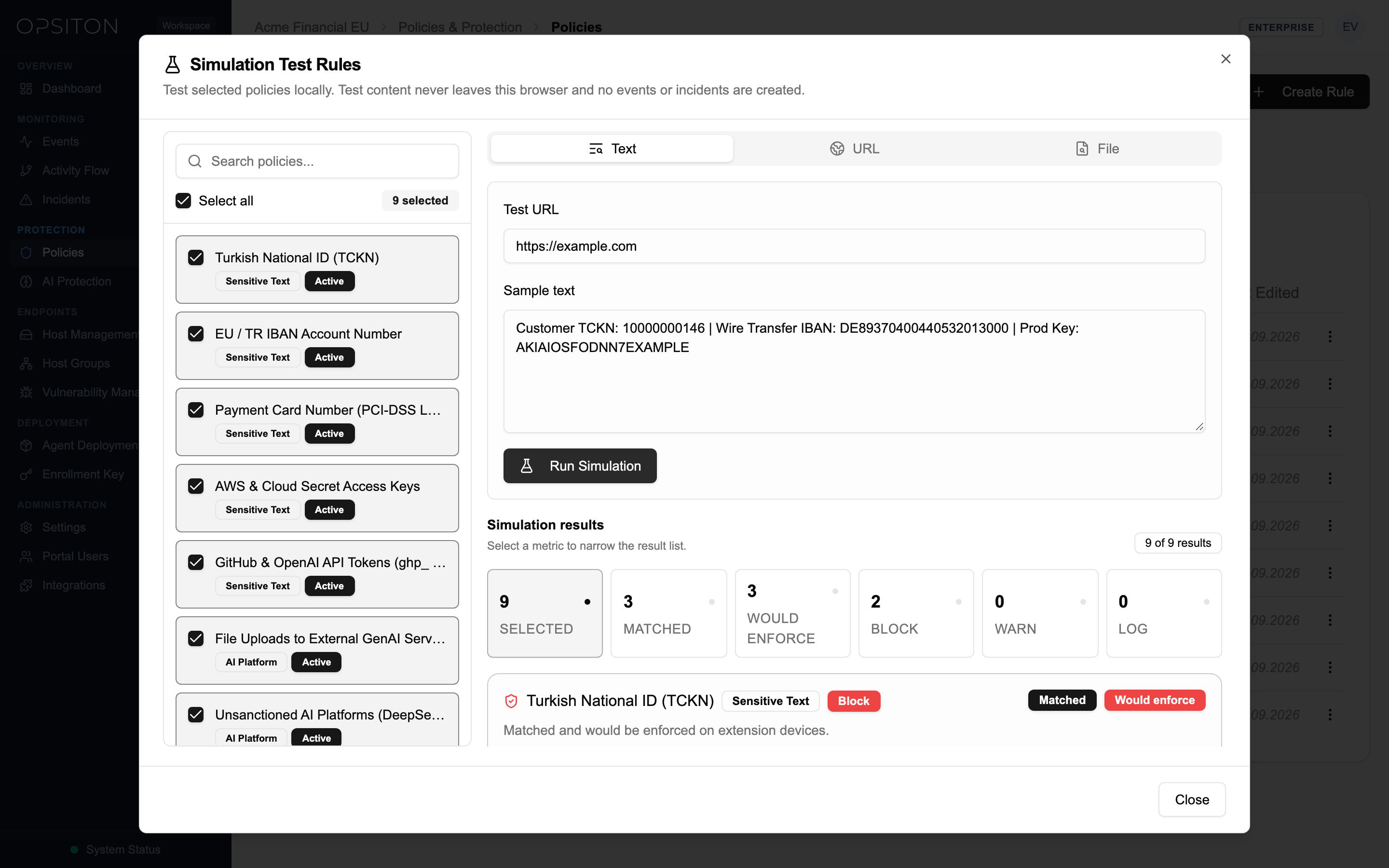
Deploy Opsiton silently across thousands of enterprise workstations using your preferred endpoint management solution (Jamf, Kandji, Microsoft Intune, or Active Directory GPO).
macOS Enterprise MDM Deployment (.mobileconfig & PKG)
Deploy the signed native .pkg installer alongside pre-configured MDM configuration profiles (.mobileconfig) available directly in the Agent Deployment console to eliminate user prompts:
- System Extension Profile: Pre-authorizes Network Extension execution without end-user confirmation prompts
- Content Filter Profile: Authorizes network content filtering for data loss prevention inspection
- Network Proxy Profile: Routes browser and desktop traffic safely through the local Opsiton native service
- Direct Bypass Profile: Configures enterprise direct domain bypass rules for internal and OS infrastructure
macOS & Windows Silent Rollout
Copy your organization-specific silent installation scripts (Jamf/CLI for macOS PKG and Intune/GPO for Windows MSI) paired with your fleet Enrollment Token directly from the Portal > Agent Deployment screen.
Browser Extension Force-Installation (Chrome & Edge)
Ensure the Chrome and Edge extensions are permanently installed and non-removable by pushing the ExtensionInstallForcelist policy via MDM or Active Directory GPO using the policy strings provided in the Agent Deployment console.
11MDM Root CA, TCC (PPPC) & EDR / Antivirus Exclusions
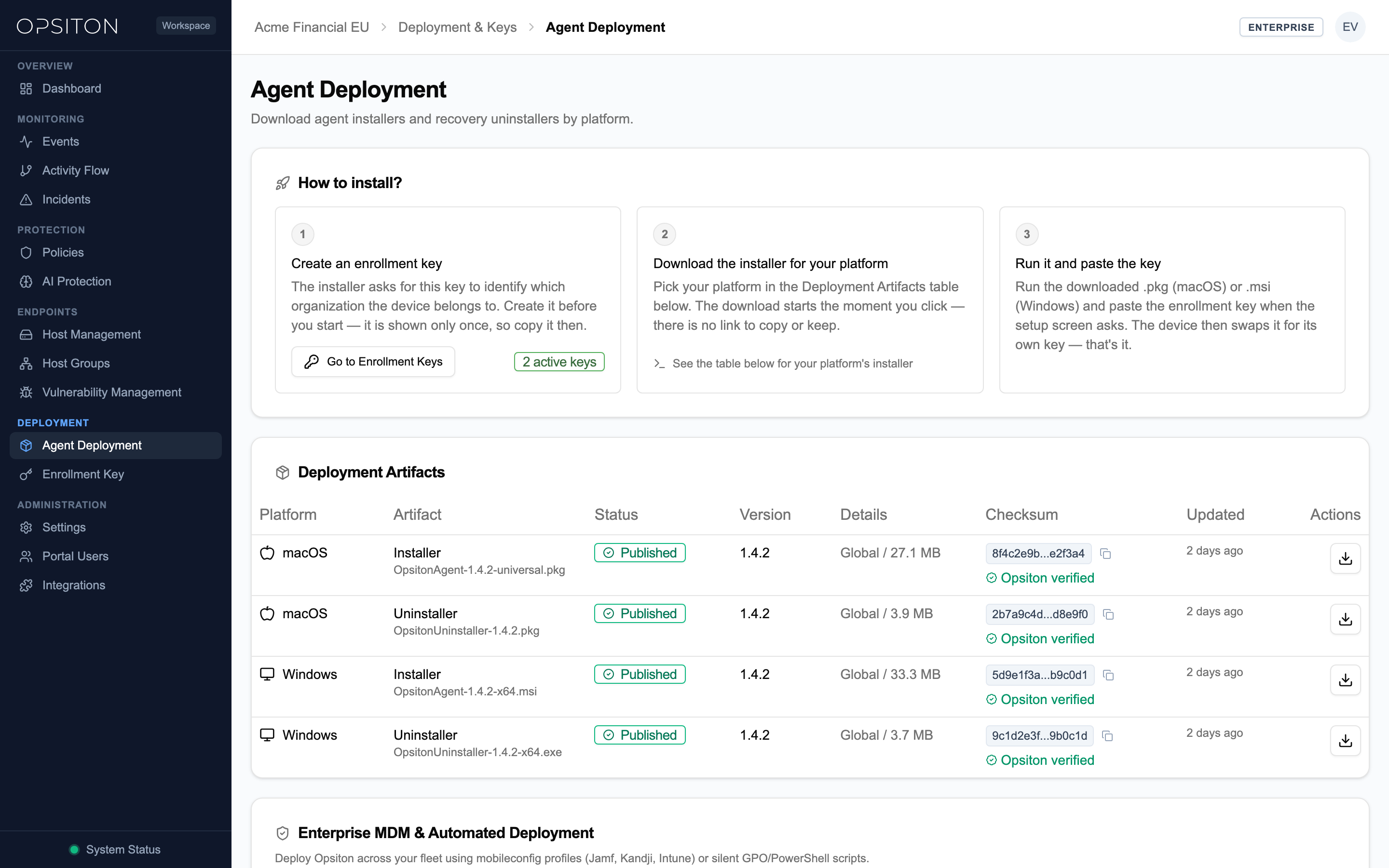
To achieve a 100% zero-touch rollout without OS security prompts or conflicts with third-party EDR/AV agents (CrowdStrike Falcon, SentinelOne, Microsoft Defender for Endpoint), configure the following MDM payload categories and exclusions using the exact values in your Tenant Portal.
1. macOS Zero-Touch Root CA & MDM Payloads
In silent MDM deployments, the Opsiton installer skips interactive Keychain password prompts so administrators can deploy the local Root CA and system extension approvals via standard Apple MDM payloads:
| Component | Configuration Source | MDM Payload Type |
|---|---|---|
| Apple Developer Team ID & Bundle IDs | Provided in Portal > Agent Deployment | com.apple.system-extension-policy & PPPC |
| Network Extension (Content Filter & Proxy) | Pre-configured .mobileconfig in Portal | com.apple.webcontent-filter |
| Local Inspection Root CA | Generated per endpoint or MDM PKCS#1 payload | com.apple.security.pkcs1 |
2. macOS TCC / PPPC Privacy Permissions
Deploy the pre-built Privacy Preferences Policy Control (com.apple.TCC.configuration-profile-policy) profile from the Agent Deployment console to grant Full Disk Access (for local file upload inspection) and Accessibility permissions without user popups.
3. EDR & Antivirus Exclusion Guidelines (macOS & Windows)
Exclude the Opsiton agent installation directories and local inspection service in CrowdStrike Falcon, SentinelOne, Microsoft Defender for Endpoint, or Sophos (exact installation paths are listed in the Agent Deployment console) to prevent TLS double-inspection deadlocks and CPU overhead.
12Inviting Team Members
To grant security team members access to the Tenant Portal:
- 1Navigate to Users in the sidebar
- 2Click the Invite User button
- 3Enter the corporate email address
- 4Select the appropriate role: Viewer, User, or Tenant Admin
- 5Click Send Invite
13Accepting an Invitation
- 1Open the automated invitation email received from Opsiton
- 2Click the secure invitation link
- 3Set a strong account password
- 4Sign in with your new credentials
- 5You will land directly on the Dashboard with your assigned permissions
14API Keys & Enrollment Tokens
Opsiton separates operational API keys from device enrollment credentials for defense-in-depth security:
Device Enrollment Tokens (ops_tok_...)
Used exclusively during endpoint agent installation to automatically register devices into your organization without exposing admin API privileges.
Organization API Keys (sk_opsiton_...)
Used for programmatic REST API access, CI/CD pipeline automation, and SIEM / SOAR integrations.
- 1Go to Settings > API Keys
- 2Click Create New Key
- 3Provide a descriptive label
- 4Copy and securely store the key immediately (it is only displayed once)
sk_opsiton_{org_slug}_{random_secret}15Endpoint Agent & Browser Extension Synergy
Opsiton delivers maximum endpoint visibility by combining an in-browser companion extension with a native background daemon:
Browser Extension (Chrome, Edge, Brave)
- Real-time DOM inspection: Evaluates text inside input fields, rich-text editors, and textareas before submission
- UI Protection: Renders user-friendly warn dialogs and block screens directly within the browser tab
- Isolated Local IPC: Communicates directly with the local agent daemon in under 1 millisecond
Native Endpoint Daemon (macOS & Windows)
- OS Network Interception: Intercepts desktop apps (Slack, Teams, ChatGPT Desktop, IDEs) and CLI tools (curl, git)
- System Tray: Displays real-time protection health, policy sync status, and pause/maintenance controls
- Hardware Efficiency: Minimal resource footprint consuming less than 1% CPU and under 50MB RAM
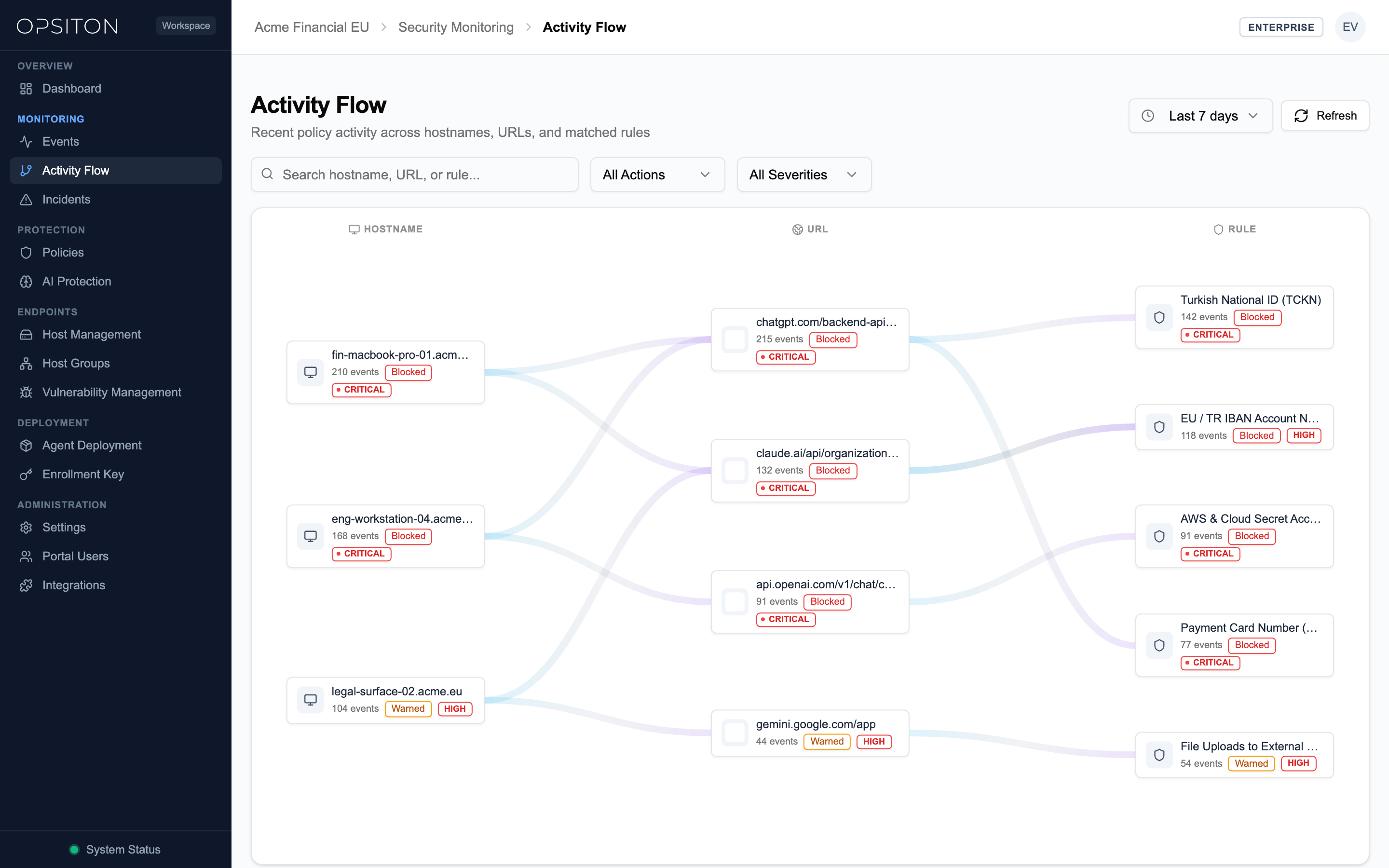
16Security Events & Audit Logs
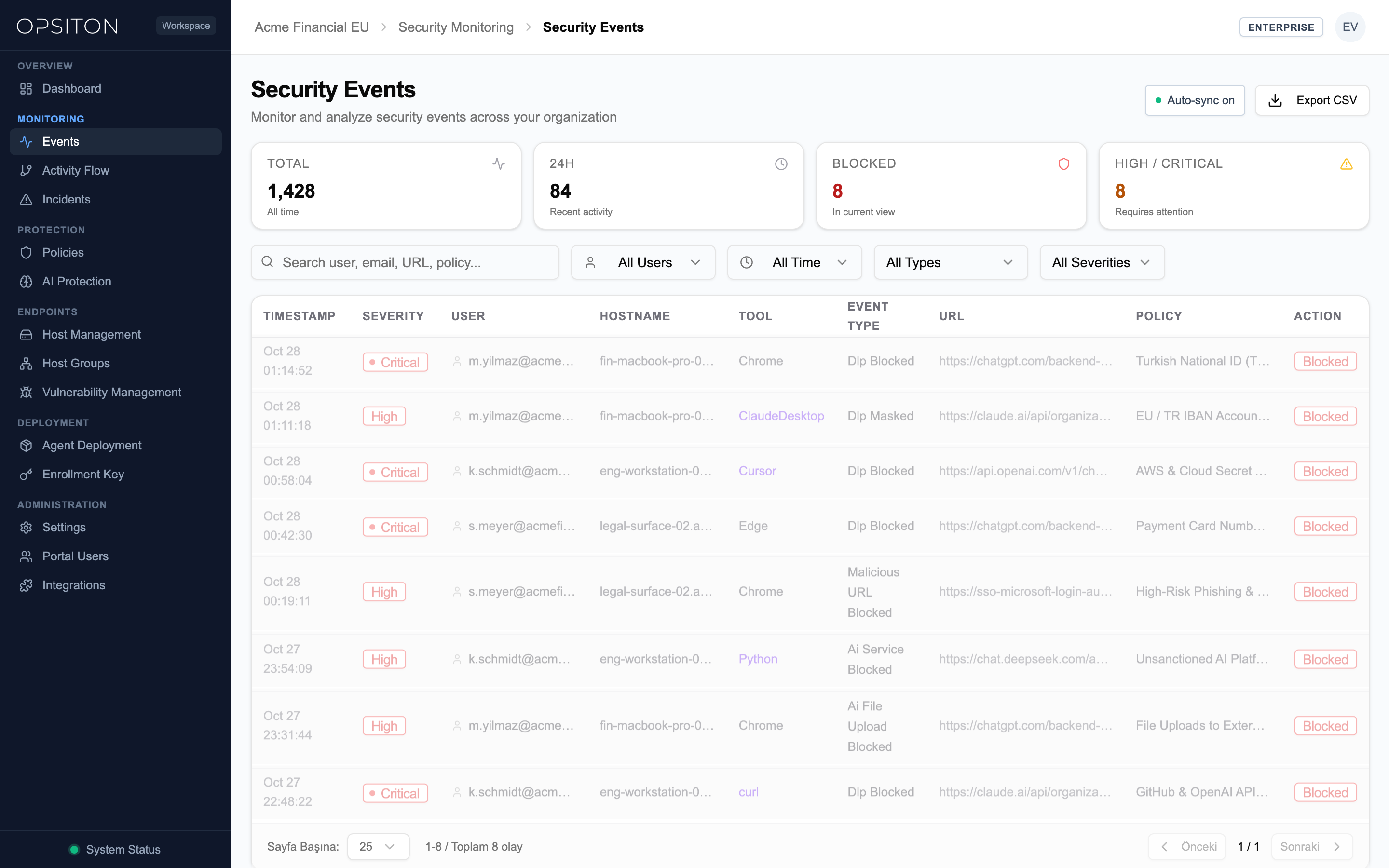
The Events page records every policy match across all enrolled endpoints in your organization.
| Audit Field | Description |
|---|---|
| Type | Detection category (DLP_TEXT, CHECKSUM, AI_PLATFORM, DLP_FILE, THREAT_URL, NER) |
| Rule Name | The exact policy rule that triggered the detection |
| Application / Domain | The web domain (e.g. chatgpt.com) or native process (e.g. curl.exe) involved |
| Severity | Critical, High, Medium, or Low severity ranking |
| Action Taken | Enforcement outcome: Blocked, Warned, Logged, or Masked |
| Masked Snippet | Sanitized excerpt of the matching text with sensitive digits redacted |
| Time | Precise UTC timestamp of the recorded event |
17Incident Triage & Response
Incidents represent high-priority security cases that require formal investigation, resolution, and compliance documentation.
| Lifecycle State | Definition |
|---|---|
| Open | Newly created incident awaiting triage and investigator assignment |
| Investigating | An assigned security analyst is actively analyzing root cause and risk |
| Resolved | Remediation actions taken, risk mitigated, and resolution notes recorded |
| Closed | Formally approved and archived case for audit compliance |
18Active Endpoints & Fleet Inventory
The Active Users page provides a live inventory of all registered endpoints across your enterprise.
| Inventory Field | Description |
|---|---|
| Hostname | Device hostname and network identity |
| Operating System | macOS (Apple Silicon / Intel) or Windows (10 / 11 / Server) |
| Status | Online (currently connected) or Offline |
| Agent Version | Installed version of the native system daemon |
| Extension Version | Installed version of the browser extension |
| Health & Protection | Real-time status: Protected, Warning, or Paused |
| Last Seen | Timestamp of the most recent heartbeat |
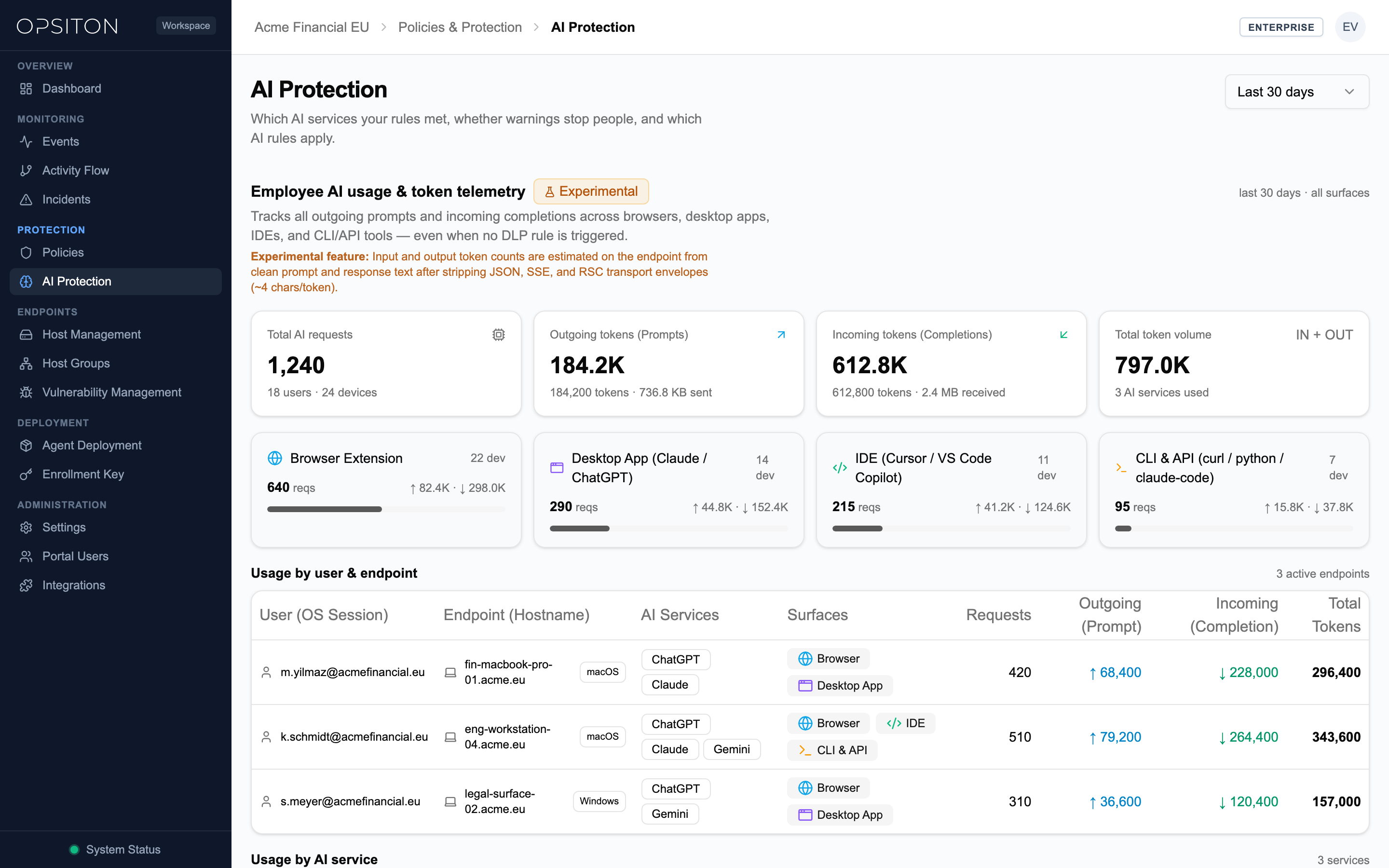
19Generative AI Platform Protection
Opsiton monitors 40+ AI providers at the endpoint network layer across Browser, IDE, CLI, and Desktop, while the browser companion extension adds deep in-DOM adapters for six major enterprise GenAI web platforms:
- Deep DOM Web Adapters: OpenAI ChatGPT, Anthropic Claude, Google Gemini, Microsoft Copilot, DeepSeek, and Perplexity (plus 40+ AI providers governed at the OS network layer)
- Prompt Interception: Inspects user prompts before transmission, blocking or masking source code, customer records, or API credentials
- Paste Blocking: Detects clipboard pasting of large confidential codebases or confidential customer data
- File Upload Filtering: Pre-inspects documents attached to AI chat sessions and prevents proprietary document exposure
20Latency Telemetry & High Performance
Data security must not compromise employee productivity. Opsiton is engineered as a compiled native system service for ultra-low latency enforcement.
- Sub-15ms Inspection Overhead: P95 latency overhead introduced by local inspection is under 15 milliseconds
- Transparent Telemetry: The /performance console displays live round-trip latency, upstream TTFB, and pattern/OCR evaluation times
- Zero Impact on Browsing: Local pre-filtering bypasses non-inspected traffic immediately, ensuring full network speed
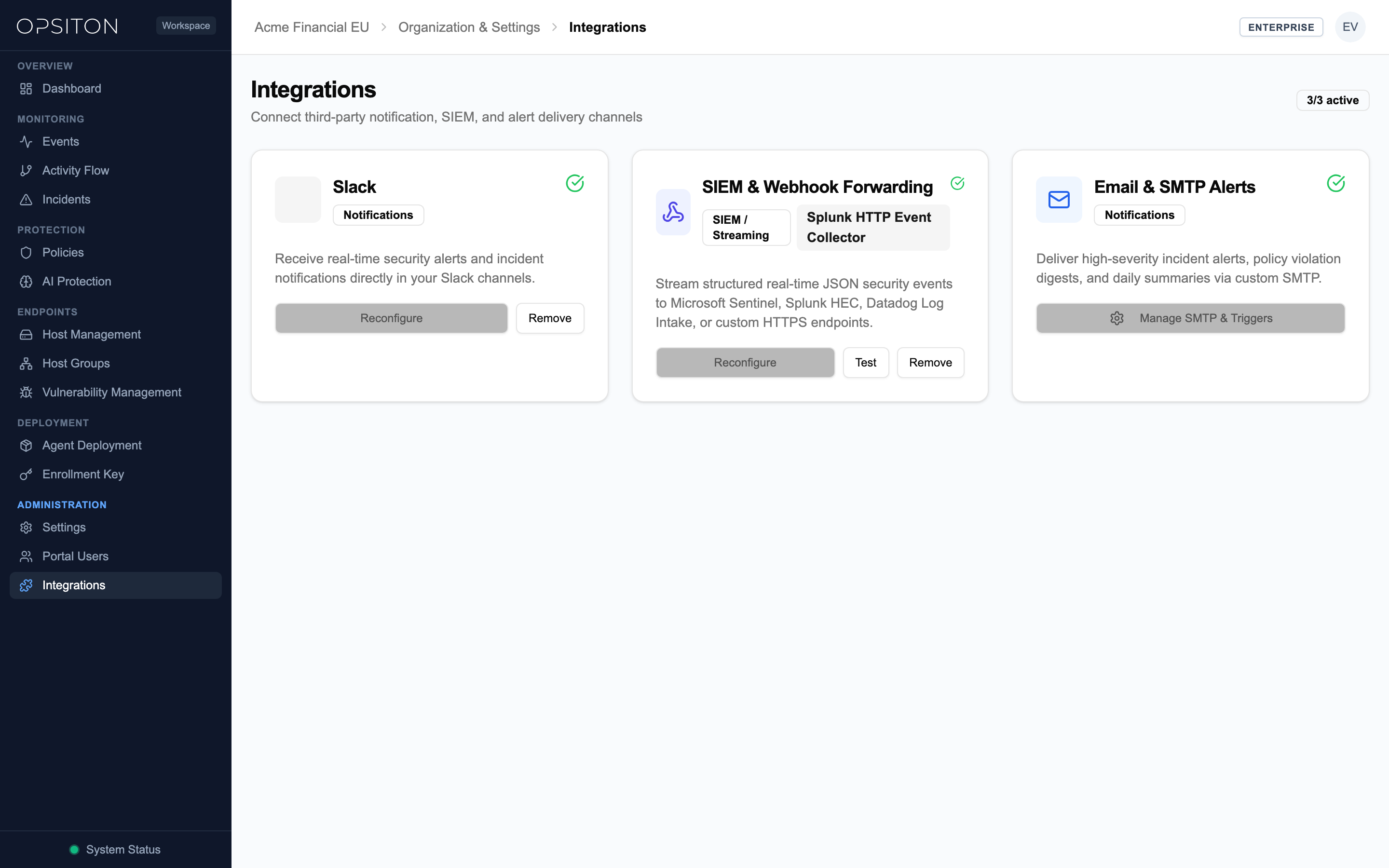
21Settings, Alert Channels & Security Controls
Connect Opsiton into your existing enterprise notification workflows and enforce strict portal access controls.
| Integration / Control | Functionality |
|---|---|
| Slack Webhooks | Streams real-time notifications for High and Critical policy violations and incidents directly into SOC Slack channels |
| Custom SMTP & Email Alerts | Delivers policy violation alerts and incident notifications via custom SMTP filtered by minimum severity and policy groups |
| REST API Access | Organization API keys (sk_opsiton_...) enable programmatic policy auditing fleet telemetry and security workflow automation |
| Session Security & TOTP MFA | Enforce Time-based One-Time Password (TOTP) multi-factor authentication and session security for portal administrators |
22SIEM & Custom HTTPS Webhook Forwarding
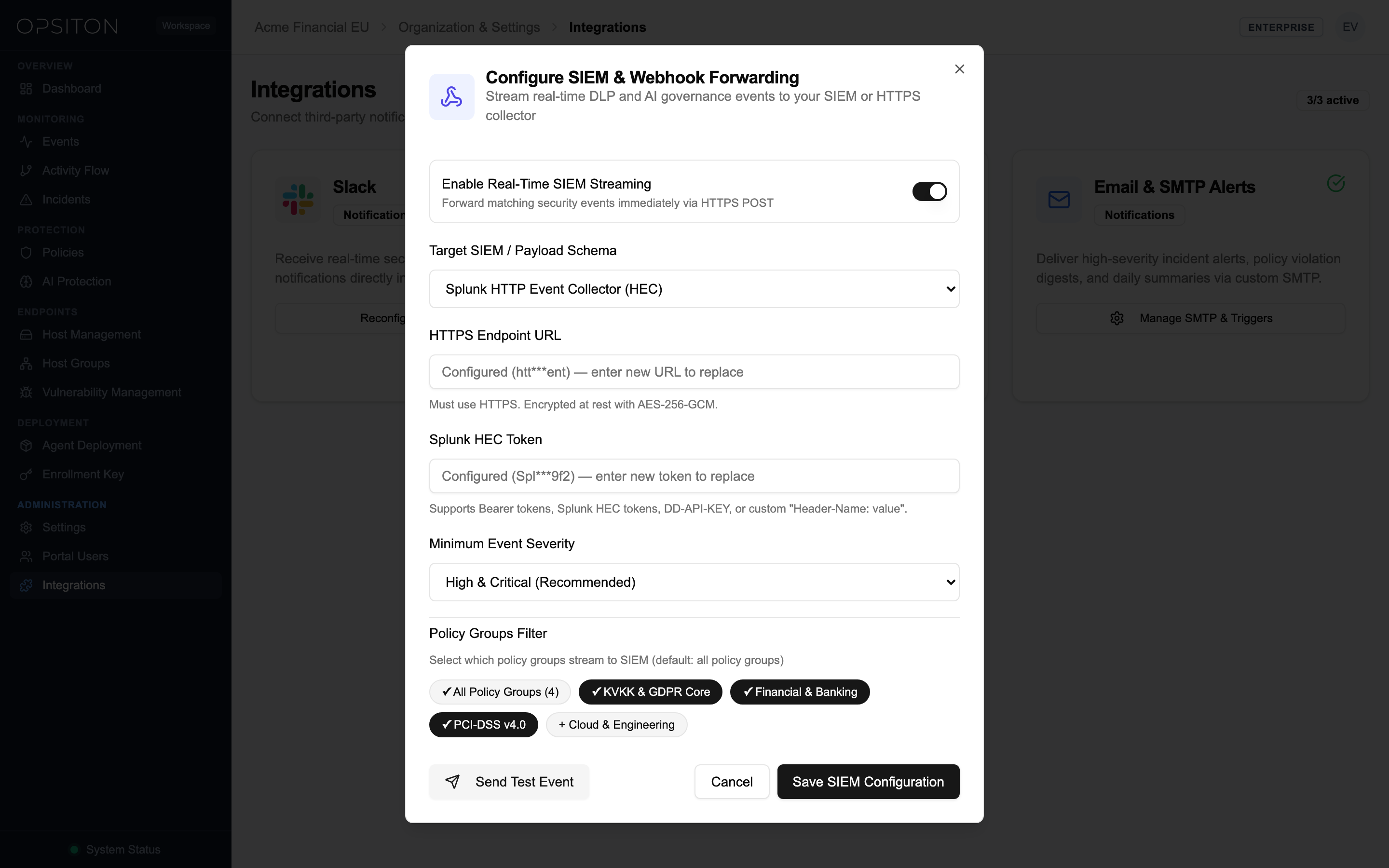
Stream sanitized DLP detections, Shadow AI prompts, and threat URL events in real time to your enterprise SIEM, SOAR, or log management platform.
Supported SIEM & Log Destinations
| Destination | Integration Method | Authentication & Transport |
|---|---|---|
| Microsoft Sentinel | Azure Log Analytics Data Collector API / Custom HTTPS Webhook | HTTPS TLS 1.3 with SharedKey or Bearer Token + HMAC-SHA256 signature |
| Splunk Enterprise / Cloud | Splunk HTTP Event Collector (HEC) endpoint (/services/collector/event) | Authorization: Splunk <HEC_TOKEN> over HTTPS |
| Datadog Cloud SIEM | Datadog HTTP Log Intake API (http-intake.logs.datadoghq.eu) | DD-API-KEY header over HTTPS (EU & US intake regions supported) |
| Custom HTTPS Webhook | Any SOC SOAR or internal HTTPS receiver endpoint | Custom Authorization Bearer header + X-Opsiton-Signature (HMAC-SHA256) |
Configuring Event Forwarding in the Tenant Portal
- 1Navigate to Settings > Notifications & SIEM Webhooks in the Opsiton Tenant Portal
- 2Select your destination type (Microsoft Sentinel, Splunk HEC, Datadog, or Custom HTTPS Webhook)
- 3Enter the HTTPS ingestion URL and optional Authorization header or Signing Secret
- 4Select the minimum severity threshold (Low, Medium, High, Critical) and event categories to stream
- 5Click Send Test Event to verify connectivity and inspect the HTTP 200 response
Sample Webhook JSON Payload Schema
{
  "event_id": "evt_01J9Z8K4M2N6P8Q1R3S5T7V9W",
  "timestamp": "2026-10-28T09:14:22.418Z",
  "tenant_id": "org_opsiton_eu_central_1",
  "data_residency": "eu-central-1 (Frankfurt, EU)",
  "severity": "critical",
  "action_taken": "masked",
  "policy": {
    "rule_id": "rule_sit_tr_tckn",
    "rule_name": "TR National ID (TCKN Checksum)",
    "category": "CHECKSUM",
    "compliance_pack": ["KVKK_MADDE_12", "GDPR_ART_32"]
  },
  "endpoint": {
    "hostname": "macbook-pro-sec-04.local",
    "os": "macOS 15.1 (arm64)",
    "surface": "Browser (Chrome Extension + Native Agent)",
    "process_name": "Google Chrome"
  },
  "destination": {
    "domain": "chatgpt.com",
    "url": "https://chatgpt.com/backend-api/conversation",
    "ai_provider": "OpenAI ChatGPT"
  },
  "detection_context": {
    "match_count": 2,
    "masked_snippet": "Customer TCKN: *******4812, IBAN: TR**************9012",
    "content_sha256": "e3b0c44298fc1c149afbf4c8996fb92427ae41e4649b934ca495991b7852b855"
  }
}
23Regulatory Compliance Mappings (GDPR, KVKK, HIPAA, EU AI Act, PCI-DSS)
Opsiton ships with 18 Built-in SIT Patterns + 4 Compliance Packs (23 Total Rules) that map directly to technical safeguard requirements across major international regulations:
| Regulation | Specific Articles & Clauses | Opsiton Technical Enforcement & Controls |
|---|---|---|
| GDPR (EU) | Art. 5(1)(f) Integrity & Confidentiality · Art. 25 Data Protection by Design · Art. 32 Security of Processing | On-device detection of EU IBAN national IDs emails and unstructured PII (NER); inline MASK or BLOCK before external AI transfer; EU Data Residency in Frankfurt (eu-central-1) |
| KVKK (Law No. 6698) | Madde 12 (Obligations Concerning Data Security) | Algorithmic 11-digit TCKN checksum validation TR IBAN and Turkish OCR/NER; blocks or masks personal data before uncontrolled cross-border or third-party AI transfer |
| HIPAA (US Healthcare) | 45 CFR §164.312(a)(1) Access Control & §164.312(e)(1) Transmission Security | Built-in SIT patterns for PHI ICD-10 diagnostic codes NPI numbers MRN and SSN; inspects clinical documents and images locally on the endpoint |
| EU AI Act | Art. 10 Data & Data Governance · Art. 15 Accuracy Robustness & Cybersecurity | Shadow AI discovery across 40+ AI providers deep DOM prompt auditing inline token masking ([TCKN_1]) and unapproved free-tier LLM blocking |
| PCI-DSS v4.0 | Requirement 3 (Protect Stored Account Data) & Requirement 4 (Protect Cardholder Data in Transit) | Deterministic Luhn checksum verification for PAN (Visa Mastercard Amex Troy) and CVV/Track Data; immediate BLOCK on unauthorized channels and masked event logs |
24Verified Enterprise Use Cases
The following four enterprise enforcement scenarios are continuously verified across macOS and Windows endpoints:
1. Country / TLD-Based Phishing & Malicious Domain Blocking
- Blocks suspicious top-level domains (e.g. *.cn, *.ru, *.top, *.xyz) and newly registered phishing sites at the Browser and OS Network layers
- Combines Threat URL intelligence feeds with custom wildcard domain rules and file upload restrictions
- Technical Distinction: Active agent inspection evaluates and blocks matching wildcard/keyword URLs in real time; if the agent stops, administrator-configured PAC risk domains enforce fail-closed connection drop (REQ-PRX-001)
2. Typosquatting & Homograph Protection
- Real-time detection and warning/blocking of lookalike corporate login domains (e.g. 0psiton.com, rnicrosoft.com)
- Catches Punycode / IDN homograph attacks (xn--*) and character substitution phishing before credentials or files are submitted
3. AI Prompt & File Upload DLP (Shadow AI Governance)
- Applies inline MASK or instant BLOCK when source code, API keys (AWS, GitHub PAT, Stripe), TCKN/SSN/IBAN, or customer tables are pasted or uploaded to ChatGPT, Claude, DeepSeek, Gemini, or Copilot
- Inspects PDF, DOCX, XLSX, and image attachments locally via document parsing and on-device OCR before upload
4. 4-Surface Process-Aware Endpoint Inspection
- Catches non-browser leaks by combining Browser Extension + Native Desktop App + CLI/Terminal (curl, python, claude-code, git) + OS Network Extension (macOS NE / Windows WFP)
- Provides exact process attribution (e.g. curl, python3, Claude Desktop) in security event logs
25Subscription Plans & Enforced Limits
Opsiton offers straightforward per-agent pricing with no artificial policy or administrator limits. Every plan includes unlimited security policies and unlimited portal users, and the browser extension never consumes a separate seat. Start with a 14-Day Free Trial · Up to 5 Devices · No Credit Card Required.
| Plan | Portal Users | Endpoint Agent Seats | Key Features Included |
|---|---|---|---|
| Free | Unlimited | 1 Endpoint ($0) | Unlimited Policies, Preset DLP Templates, Incidents, NER & OCR, Custom Patterns, 6 mo Event History |
| Starter | Unlimited | Unlimited ($5/mo or $50/yr per seat) | Domain Upload Blocking, Keyword URL Rules, Host & Policy Groups, Slack & Email Alerts, 6 mo History |
| Professional | Unlimited | Unlimited ($10/mo or $100/yr per seat) | File-Type Blocking, Preset DLP Rules (Card, IBAN, National ID), Incidents Workflow, 12 mo History |
| Business | Unlimited | Unlimited ($15/mo or $150/yr per seat) | NER-Based Contextual Detection, Image & Document OCR, Custom Rule Patterns, 3 yrs Event History |
| Enterprise | Unlimited | Custom Fleet (Billed per seat) | Inline Masking/Redaction, Browser CVE Tracking, On-Premise Deployment, 4 yrs Event History, Custom SLA |
Free Evaluation & Subscription Lifecycle
The permanent 1-endpoint Free plan includes everything Business detects (OCR, NER, and custom rule patterns), allowing you to evaluate the real product on one real machine with no time limit; multi-device evaluation periods are provisioned on request. Paid subscriptions include a 7-day payment grace window before protection pauses in maintenance mode without data loss.
26Security Posture Scoring Formula
The Security Score on your Dashboard represents the overall risk health of your fleet on a scale of 0 to 100.
- Incident Impact: Open, unresolved incidents apply a weighted reduction based on severity
- Event Volume: High and Critical severity violations within the last 7 days lower the overall score
- Triage Velocity: Promptly investigating and resolving incidents restores your score back toward 100%
- Fleet Hygiene: Outdated agent or browser versions introduce minor deductions until updated